 First In
Short answer. Jake's Resume is a free, MIT-licensed LaTeX template by Jake Gutierrez. It is ATS friendly because it avoids everything resume parsers are known to stumble on: columns, tables, graphics, icons and text hidden in headers. It also suits the human skim, with bold job titles, right-aligned dates and tight bullets. Get our Google Doc version, or read on to see why it works and how to fill it in.
The ATS-readiness scorecard
Before the details, the scoreboard. We wrote a 10-point checklist from the formatting problems that the applicant tracking system Greenhouse lists as causes of a failed resume parse (3), plus a few plain-text basics. Each check is worth 10 points. Then we scored Jake's Resume against the kind of two-column "designer" template sold on template marketplaces: a photo, icons for contact details, skill-rating bars in a sidebar and spaced-out headings.

| Check (10 points each) | Why it matters | Jake's | Designer |
|---|---|---|---|
| One column | Greenhouse lists columned layouts as a cause of failed parses (3). | 10 | 0 |
| No tables or text boxes holding the layout | "Complex resumes with tables" are on the same list (3). | 10 | 0 |
| Nothing important in the page header or footer | Headers and footers are on the list too (3). Jake's puts your name and contact details in the body. | 10 | 10 |
| No photo, graphics or word art | Listed by Greenhouse (3), and they take space from your achievements. | 10 | 0 |
| Real text, not a picture of text | A resume uploaded as an image is not parsed at all (3). | 10 | 10 |
| Normal letter spacing | Spaced-out words like "E X P E R I E N C E" are read as separate letters (3). | 10 | 0 |
| Standard section headings | Recruiters and parsers both look for Education, Experience, Projects, Skills. | 10 | 10 |
| Contact details as plain text | An icon in place of the word "Email" carries no meaning to software. | 10 | 0 |
| Skills written as words | A bar that is "80% full" says nothing a recruiter can search or believe. | 10 | 0 |
| One page at a readable size | Jake's uses an 11 pt base size with half-inch margins, so a lot fits without shrinking the type. | 10 | 10 |
| Total | 100 | 40 |
Two honest notes. First, this is our checklist, so read it as reasoning you can check line by line, not as a measured pass rate. Second, the designer template is not doomed: a modern parser may read it fine, and a person will still open the file. But every check it fails is a chance for your details to land in the wrong field, and Jake's gives that chance away to nobody.
What Jake's Resume is, and why so many engineers use it
Jake's Resume is a one-page resume template written in LaTeX by Jake Gutierrez and published on GitHub as jakegut/resume under the MIT licence (1). Its own README credits an earlier template, sb2nov/resume, as the starting point. It is also on Overleaf, the online LaTeX editor, as "Jake's Resume", described there as "a simple, straight-forward resume template" (2).
When we checked on 18 November 2026, the GitHub repository had about 2,800 stars and more than 700 forks (1). That is unusual reach for a single resume file, and it is a regular recommendation in software engineering resume threads such as r/cscareerquestions. The repository is archived, which for a template is a good sign: it is finished.
The source even says what it is for. One line in the file turns on Unicode mapping in the PDF, with the comment Ensure that generate pdf is machine readable/ATS parsable (1). It was designed with applicant tracking systems in mind from the first draft.
What an ATS really does (and the 75% myth)
An applicant tracking system, or ATS, is the software employers use to receive and manage applications. Greenhouse, Lever, Workday, Ashby and iCIMS are common ones. Most of the scary advice online gets their job wrong, so here is what the vendors' own documentation says they do.
- It parses your resume into fields. Greenhouse "scans an imported resume and auto-fills appropriate fields" on your candidate profile. When a parse fails, the file is only attached, and the details have to be typed in by hand (3).
- It applies the employer's knockout rules. These run on your answers to the application questions, such as work authorisation or a required licence, not on your resume's design. Ashby, for example, lets employers "automatically archive candidates based on their answers" to application questions (5).
- Recruiters search it by keyword. Greenhouse lets recruiters turn on full-text search and find candidates whose resumes contain their search terms (4). If the words a recruiter types are not in your resume, you do not come up.
- A person reads it, fast. In an eye-tracking study by the job site Ladders, recruiters skimmed resumes for an average of 7.4 seconds. Simple layouts with clear sections and headings held their attention; cluttered designs and multiple columns did poorly (7). It is one company's study, not peer-reviewed, but it matches what any recruiter will tell you.
About "75% of resumes are rejected by ATS". You will see this number everywhere. It traces back to a sales pitch from Preptel, a resume-services company that went out of business in 2013, and no study behind it has ever been produced (6). An ATS does not read your resume and decide you are unworthy. People set up the rules, and people make the calls.
So the real risks are less dramatic, and entirely in your control: a messy parse that garbles your profile, missing keywords that keep you out of searches, and a layout that loses a skimming recruiter. Jake's Resume removes the first and third. The tailoring workflow below handles the second.
Why this layout wins
A parser reads a PDF as a stream of text. With one column, that stream comes out in the same order you see on the page. With two columns, a parser may read straight across both, line by line, and splice your skills sidebar into the middle of your job history.

Everything else in Jake's layout follows the same idea:
- Standard headings. Education, Experience, Projects, Technical Skills. No "My Journey", no "What I Bring".
- Real text everywhere. No icons, photo, logos or skill bars. A phone number is just a phone number.
- Dates on the right, titles in bold. The recruiter's eye runs down the left edge for titles and employers, and down the right edge for dates. That is the skim, built into the page.
- Dense without being cramped. 11 pt text and half-inch margins fit three jobs, three projects and a skills block on one page.
Try the copy-paste test on your current resume: open the PDF, select all, copy, and paste into a plain text editor. If the text comes out scrambled or out of order, software may struggle with it too. A single-column Jake's Resume PDF should paste out in reading order.
See how many people applied, and how well you match, on every LinkedIn job card. Free. Filters are free for 3 days.
Add to Chrome — freeJake's Resume, section by section
Each figure below is a slice of the sample resume further down this page. The numbers match the notes under each picture.
1. Heading

- Your name, large and centred. It sits in the body of the page, not in the document header, which Greenhouse lists as a parsing risk (3).
- One line of plain-text contacts: phone, email, LinkedIn, GitHub. Spell links out (linkedin.com/in/you) so they still work on paper. A city is optional; a street address, photo, date of birth or marital status do not belong here.
2. Education

- A standard heading in small capitals with a rule beneath. Easy for eyes and for software.
- School on the left, location on the right.
- Degree in italics, dates on the right. Add a GPA only if it helps you (a common rule of thumb is 3.5 or higher), and relevant coursework only while you are a student.
Jake's puts Education first, which suits students and new grads. After a few years of work, many engineers move it below Experience. The layout does not care either way.
3. Experience
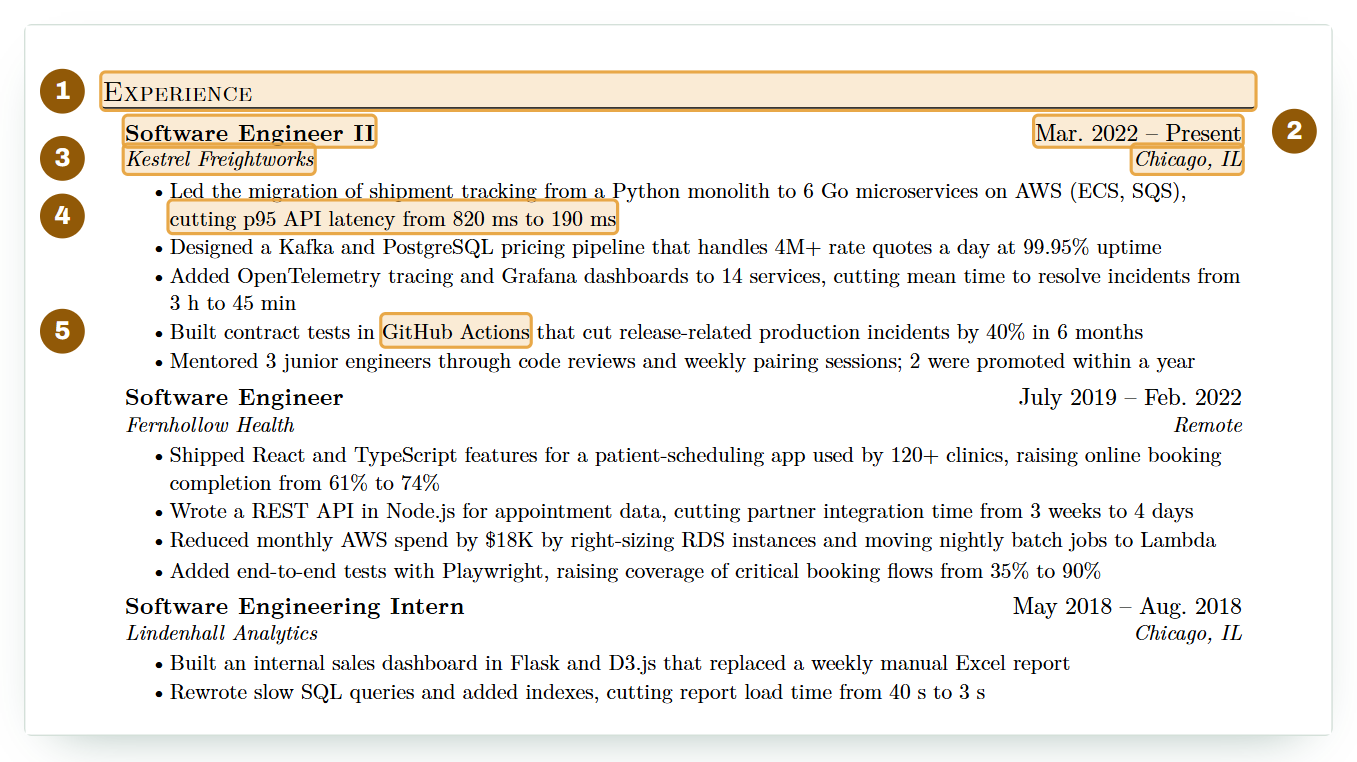
- The heading recruiters look for first.
- Job title in bold, dates on the right. Use the standard title for what you did ("Software Engineer II", not an internal code like "MTS-3"), since recruiters search titles.
- Company in italics, city or "Remote" on the right.
- A measurable result in every bullet you can. "From 820 ms to 190 ms" proves the work; "improved performance" asks the reader to trust you.
- Keywords inside real achievements. GitHub Actions appears in a sentence about what it achieved, not only in the skills list. That reads better to a person and still matches a keyword search.
Three to five bullets for your current role, two to four for older ones. Most recent job first.
4. Projects
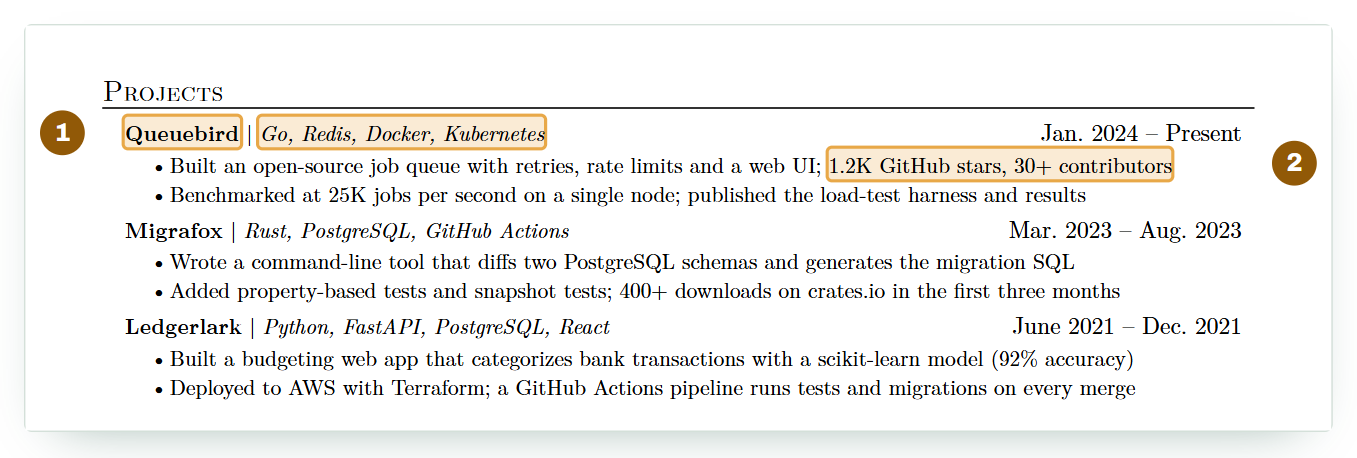
- Name in bold, then the stack in italics. The stack line is a compact, honest keyword list tied to real work.
- Proof that someone used it: stars, downloads, users, benchmarks. Numbers turn a side project into evidence.
Projects carry the most weight early in a career. If you have more than three solid jobs, keep only the projects that show something your jobs do not.
5. Technical Skills
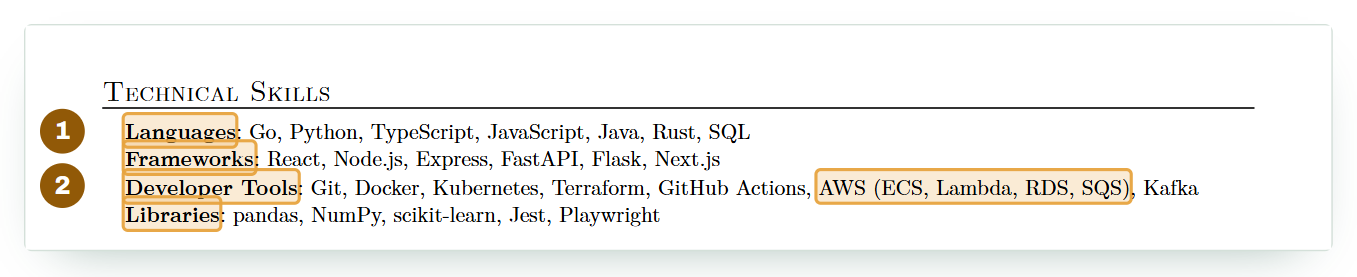
- Four labelled lines: Languages, Frameworks, Developer Tools, Libraries. Plain words a recruiter can search for.
- Write tools the way job postings do. If postings say "AWS", write AWS; if they name services, list the ones you have used. This line is the easiest place to tailor for each job.
Only list what you could talk about for five minutes in an interview. A skills line is a list of interview questions you are inviting.
How to write bullets that get interviews
Use one shape for every bullet: action verb + what you built or changed + the measurable result. If there is no number, give the scale (users, requests, teams) or the before and after.
| Before | After |
|---|---|
| Responsible for the backend of the shipment tracking system | Led the migration of shipment tracking from a Python monolith to 6 Go microservices on AWS, cutting p95 API latency from 820 ms to 190 ms |
| Worked on testing | Added end-to-end tests with Playwright, raising coverage of critical booking flows from 35% to 90% |
| Helped lower cloud costs | Reduced monthly AWS spend by $18K by right-sizing RDS instances and moving nightly batch jobs to Lambda |
| Mentored new hires | Mentored 3 junior engineers through code reviews and weekly pairing sessions; 2 were promoted within a year |
- Start with a strong verb: built, led, shipped, cut, designed, migrated, automated, reduced.
- Keep it to one or two lines. A bullet that wraps onto a third line is two bullets.
- Never invent a number. Estimate honestly ("about 40%") and be ready to explain how you know.
Tailor it to every job, in five minutes, with First In
Here is the part most resume guides skip. A perfect resume is wasted if it arrives as applicant #400, or if it never mentions the three skills the posting cares about. Two things decide whether your Jake's Resume gets read: when you send it and which words are in it. First In, our free Chrome extension for LinkedIn Jobs, handles both.
1. Pick jobs you fit, while they are still quiet
First In puts the number of applicants and your match score out of 100 on every LinkedIn job card. Sort by best match, then look for green applicant counts. Timing matters more than most people think: in a St. Louis Fed analysis of applications in technology, software and other professional fields, 41% of all applications arrived within 48 hours of a job being posted (8). More on that in how to apply early on LinkedIn.
2. Read the missing skills, then fix your Skills line
Click any match score to see Why this score: points for title (out of 50), skills (out of 31) and level (out of 19), the skills you have, and the skills the job asks for that are not on your profile. That list is your tailoring checklist. If you really have a missing skill, add it to your Technical Skills line and work it into a bullet where it belongs. Add it to your LinkedIn profile too, press Read my profile again in First In, and your score on similar jobs goes up. How the score works: LinkedIn job match vs First In's match score.

3. Copy the job into ChatGPT and sharpen your bullets
Press Copy on the card (part of the filters, free for 3 days). The title, company, details and the full description go to your clipboard in one click. Paste them into ChatGPT or any AI assistant with your resume and a prompt like this:
Here is a job posting and my resume.
1. List the 10 skills and keywords this posting cares about most.
2. Tell me which of them are missing from my resume.
3. Rewrite at most 4 of my bullets to use the posting's wording,
   only where it truthfully describes what I did.
Do not invent experience, tools or numbers. Keep each bullet under two lines.

Keep a master copy of your resume, make a copy per application, change the Skills line and two or three bullets, and export a PDF. Five minutes, and every application speaks the posting's language.
 1:19
Applicant counts and your match score on every LinkedIn job card, free. Filters, sorting and Copy free for 3 days.
Add to Chrome — freeThe full software engineer sample
Here is the whole page for Alex Rivera, a fictional mid-level software engineer with four and a half years of experience. Every company, project and number is invented to show the shape of a strong resume; borrow the structure, not the facts.
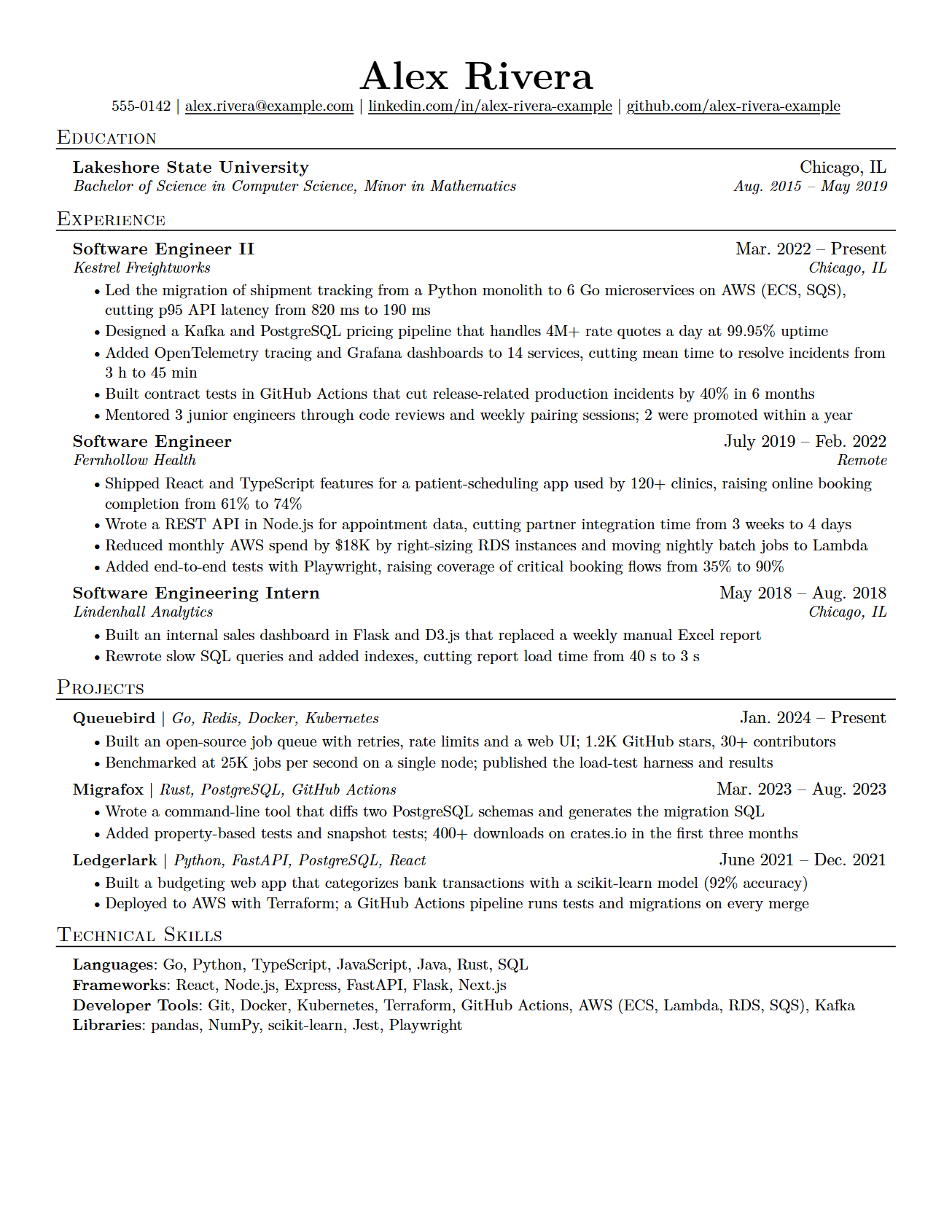
What makes it work: every bullet has a result, the newest and most relevant work gets the most room, the projects show skills the jobs don't (Rust, open source), and the skills line repeats the tools the bullets prove.
Get Jake's Resume as a Google Doc
No LaTeX needed. Our Google Doc keeps the Jake's layout: one column, standard headings, right-aligned dates on a tab stop (not a table), and the sample above already filled in so you can see where everything goes.
- Press the button, then Make a copy. The copy lands in your own Google Drive.
- Replace the sample text with yours, section by section.
- Keep it to one page, then File › Download › PDF document, unless the posting asks for Word.
Prefer the original? Use Jake's Resume on Overleaf or the source on GitHub. All credit for the design goes to Jake Gutierrez; the template is MIT licensed, and our Google Doc is an adaptation of its layout.
When not to use Jake's Resume
- Design and creative roles, where the resume itself is a portfolio piece. Still keep an ATS-safe version for online applications.
- Countries and fields that expect a CV with a photo or more personal details. Follow local norms.
- Senior careers with long histories may need a second page. Jake's style works on two pages; the one-page rule is a habit, not a law.
- You will not be the only one using it. That is fine. Recruiters read the content, not the frame, and a familiar layout is quick to scan.
Common questions
Is Jake's resume ATS friendly?
Yes. It is a single column of real text with standard headings, and it avoids what parsers are known to stumble on: columns, complex tables, graphics, photos and text in headers or footers. The LaTeX source also turns on a setting to make the PDF machine readable. No template can promise a perfect parse in every ATS, but this one avoids the known problems.
Is there a Jake's resume Google Docs version?
The original is LaTeX, for Overleaf. Our Google Doc keeps its one-column layout with right-aligned dates on a tab stop, and comes filled in with a software engineer sample. Open it and choose File, then Make a copy.
Is Jake's resume template free to use?
Yes. Jake Gutierrez published it under the MIT licence, which allows free use, copying and modification, including for your own job search.
Should a resume be one page?
For students, new grads and most people with under about ten years of experience, yes: one page forces you to keep only your strongest evidence, and recruiters skim fast. With a long, relevant history, a second page is fine if every line on it earns its place.
Can I use Jake's resume for non-CS jobs?
Yes. Rename Technical Skills to Skills, and change its lines to fit your field, such as Tools, Certifications and Languages. Replace Projects with a section your field values, or drop it. The one-column layout works for finance, operations, marketing, healthcare and most other fields.
Does an ATS automatically reject resumes?
Not because of how your resume looks. The widely repeated claim that 75% of resumes are rejected by ATS has no study behind it. Employers can set knockout rules on application answers, such as work authorisation, and recruiters search by keyword, so answer questions honestly and use the posting's words for skills you really have.
Should I send my resume as a PDF or a Word file?
Follow the job posting first. If it does not say, a text-based PDF is a safe choice: Greenhouse, for one, names .docx and .pdf as document formats it parses. Never upload a scan or an image of your resume.
How do I find the right keywords for my resume?
Read the posting for skills and tools named more than once. First In shows, on every LinkedIn job, which skills the job asks for that are missing from your profile. Add the ones you really have to your Skills line and a relevant bullet.
Sources
- Jake Gutierrez, jakegut/resume on GitHub: MIT licence, resume.tex source, stars and forks as shown on 18 November 2026. Based on sb2nov/resume.
- Overleaf, Jake's Resume template, checked 18 November 2026.
- Greenhouse Support, Unsuccessful resume parse, checked 18 November 2026.
- Greenhouse Support, Search resumes for keywords, checked 18 November 2026.
- Ashby Knowledge Base, Global Application Questions & Global Auto-Reject Rules, checked 18 November 2026.
- HiringThing, Applicant Tracking Systems Aren't Excluding Job Applicants, People Are (on the origin of the 75% claim).
- HR Dive, Eye-tracking study shows recruiters look at resumes for 7 seconds (Ladders, 2018), 8 November 2018.
- Federal Reserve Bank of St. Louis, How Quickly Do People Apply for Jobs? (2017).
First In puts the applicant count and your match score on every LinkedIn job card, free, and hides promoted, reposted and already-applied jobs.
Add to Chrome — free